



Most accounting firms spend weeks getting their Webflow site looking exactly right. The fonts match the brand, the service pages read well, and the contact form actually works. Then they hit publish.
And nothing happens.
No traffic. No Google ranking. Crickets.
Here's the thing: it's not a design problem. It's not even a content problem. It's a technical foundation problem, and it could have been fixed before the site ever went live.
That's what this post is about. These are not ad hoc SEO fixes that you scramble to patch after launch. A real, repeatable system you put in place before your Webflow site ever sees a search engine.
Why Most Accounting Firm Websites Start Behind on Google
Let's be honest about what happens at most firms. Someone decides it's time for a new website. A designer builds something beautiful. And then it launches with zero thought given to how Google will actually read it.
According to a 2024 BrightEdge study, organic search drives over 53% of all website traffic across industries. For service businesses like accounting firms, that number is even higher because people actively search for help with taxes, bookkeeping, and financial planning before they ever ask a friend for a referral.
So when your site launches without the right technical SEO foundation, you are essentially building a storefront on a road with no signage. People can't find you, even if you're exactly what they need.
The good news: Webflow is genuinely one of the best platforms for technical SEO when it's set up correctly from the start.
The Problem With "We'll Fix It After Launch"
This is where a lot of firms get burned.
They think SEO is something you bolt on later, like adding a Google Analytics tag or writing a few blog posts. But technical SEO isn't content. Its structure. It's how Google understands your pages, who you serve, where you're located, and why you're credible.
Fixing it after launch creates compounding problems: pages get indexed wrong, duplicate content issues build up, and you can spend months recovering ground you never had to lose.
The better approach is to treat your launch like a system, not a sprint.
What Is Webflow Technical SEO for Accountants, Really?
Webflow technical SEO for accountants is the process of configuring your Webflow site so search engines can crawl, understand, and rank it for accounting-related searches before a single person visits it.
It covers everything from how your pages are named and structured to how fast they load to whether Google can tell you're a real accounting firm in a specific city serving specific clients.
Think of it less like "SEO stuff" and more like setting up your office correctly before you open the doors. You wouldn't hang your sign, give out your address, and then realize you forgot to set up a phone line.
The Pre-Launch System: 8 Technical Checkpoints Every Accounting Firm Needs
Here's the actual framework. These are not optional nice-to-haves. Each one affects whether Google will rank your site or ignore it.
1. Fix Your URL Structure Before Anything Gets Indexed
Your URLs should be clean, readable, and keyword-relevant. Webflow gives you full control here, but it defaults to whatever you name your pages.
Bad example: yourfirm.com/page-1 or yourfirm.com/services-23kj
Good example: yourfirm.com/tax-preparation-cpa-houston
Every service page, location page, and blog post should have a URL that tells Google exactly what it is. Set this up before launch. Changing URLs after indexing means dealing with 301 redirects, and while redirects work, they always carry some risk of traffic loss.
Quick checklist:
- All URLs are lowercase with hyphens, not underscores
- Service pages include the service name and, ideally, the city
- No numbers or random strings in the URL path
- Blog posts use the target keyword phrase
2. Set Up Your Robots.txt and Sitemap Correctly
Webflow auto-generates a sitemap at /sitemap.xml, which is great. But you need to verify it includes all the pages you want indexed and excludes the ones you don't.
Your /robots.txt file tells Google what it can and cannot crawl. A common mistake is accidentally blocking the whole site during development and forgetting to unblock it before going live.
Before you publish, go to Webflow's SEO settings and confirm your sitemap is enabled. Then submit it manually in Google Search Console on launch day.
According to Google's own documentation, submitting a sitemap helps them discover pages faster, especially for newer sites without many backlinks pointing to them. For an accounting firm launching fresh, this is essential.
3. Title Tags and Meta Descriptions: Done Right From Day One
Every single page needs a unique title tag and meta description. Not just the homepage.
Your homepage title tag should follow this pattern:
[Firm Name] | [Primary Service] | [City, State] CPA
Example: Martinez CPA | Tax Preparation & Business Accounting | Austin, TX
For service pages, lead with the keyword:
Business Tax Planning for Small Businesses | Martinez CPA Austin, TX
Webflow lets you set these individually per page in the page settings. Take the time to do every page before launch. And yes, this applies to your blog posts and any CMS-driven pages too.
For meta descriptions: keep them under 160 characters, include a natural call to action, and mention your location. These don't directly affect rankings, but they affect whether someone actually clicks your listing.
4. Heading Hierarchy: How Google Reads Your Pages
Your H1 is not just a big heading. It's Google's primary signal for what a page is about. Every page should have exactly one H1, and it should include your target keyword.
Here's how to think about it for an accounting firm:
- H1: Tax Preparation Services for Small Business Owners in California
- H2: What's Included in Our Small Business Tax Package
- H2: How Our California CPA Team Works With You
- H3: Monthly vs. Annual Filing Options
- H3: What to Expect in Your First Consultation
This structure does two things. It tells Google what the page is about in a clear hierarchy, and it makes the page easier to read for actual humans, which keeps people on the page longer.
A good rule of thumb: if you removed all the paragraph text and only read the headings, would the page still make sense? If yes, your structure is solid.
5. Schema Markup: Make Your Firm Recognizable to AI and Google
This is the one most accounting firms skip, and it matters more than ever right now.
Schema markup is structured data you add to your site that explicitly tells Google and AI tools like ChatGPT and Perplexity what type of business you are, where you're located, your hours, your services, and your reviews.
For an accounting firm, you want at a minimum:
- LocalBusiness or AccountingService schema on your homepage and contact page
- Service schema on each service page
- FAQPage schema on any FAQ sections
- BreadcrumbList schema for navigation structure
Webflow doesn't add this automatically, but you can add it through custom code embeds in the page settings. This is one area where working with someone who knows Webflow technical SEO for accountants pays for itself quickly because it's technical but not complicated once you know where to put it.
A 2023 study from Schema.org and Google research consistently shows that pages with correct schema markup see higher click-through rates in search results because they can display rich results like star ratings and FAQ dropdowns directly on the search page.
6. Page Speed: Your Site Needs to Load Fast on Mobile
Google uses Core Web Vitals as a ranking signal. That means your site's load speed, visual stability, and interactivity directly affect where you appear on page one.
Webflow is actually excellent for performance out of the box, but there are common mistakes that slow sites down:
- Uploading images at 4000px when they display at 600px
- Embedding heavy animations on every page
- Not using the WebP format for images
- Loading custom fonts from multiple providers at once
Before launch, run every main page through Google PageSpeed Insights. Aim for a score above 80 on mobile. Below 60 and you'll have a meaningful ranking disadvantage, especially competing against larger firms that have invested in performance.
For accounting firms, the homepage, service pages, and contact page are the priority. Get those fast, and you're in good shape.
7. Internal Linking: Connect Your Pages Like a Web
Google discovers and ranks pages partly by following links. If your service pages exist but nothing links to them from your homepage or blog, they're essentially invisible to search bots.
Before you launch, map out your internal links:
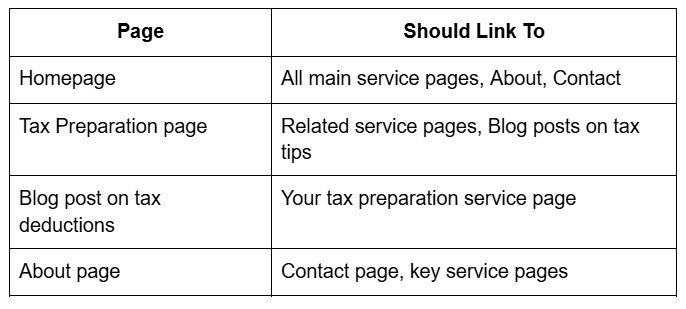
This isn't complicated. You're just making sure every page you care about has at least 2 to 3 internal links pointing to it from other pages on the site.
8. Google Search Console Setup: Do This Before or On Launch Day
Google Search Console is free, and you need it from day one. Not a week after launch. Not when you "get around to it."
Here's the exact order:
- Add your property to GSC before you launch
- Verify ownership through Webflow's custom code header
- Submit your sitemap on launch day
- Set your preferred domain (www vs. non-www)
- Check the Coverage report within the first 48 hours
GSC tells you if Google is having trouble crawling any pages, which keywords are starting to generate impressions, and whether any technical errors have crept in. It's your early warning system.
A Note on Webflow Technical SEO for Accountants vs. Generic SEO Advice
Here's something worth saying plainly: most SEO advice online is written for e-commerce stores or B2B tech companies. The keyword strategy, the competitive landscape, and the buyer intent for an accounting firm are different.
Your potential clients are searching for things like "CPA near me," "small business tax help [city]," "best accountant for self-employed," and "how to file S-corp taxes." These are high-intent, local searches. The technical foundation you build needs to support local ranking signals, not just broad keyword rankings.
That means your NAP (name, address, phone) information needs to be consistent across your Webflow site and every directory you're listed on. It means your schema markup should reference your specific service areas. And it means your page structure should make it obvious to Google that you serve people in a specific geography.
A generic Webflow template with no local SEO signals will not outrank a smaller, simpler site that has nailed its local relevance.
What This Looks Like as a System, Not a One-Time Task
Here's the mindset shift that makes the biggest difference:
Webflow technical SEO for accountants isn't a project you finish. It's a system you build once, correctly, and then maintain.
The pre-launch checklist above handles the foundation. After launch, your ongoing system looks like this:
- Monthly: Check GSC for crawl errors and new keyword opportunities
- Quarterly: Update title tags on any pages ranking on page two (a small tweak can push them to page one)
- Annually: Full technical audit, refresh schema markup, check page speed scores again after any site updates
This isn't a huge time commitment. Maybe two to three hours per month once the foundation is in place. But it compounds. Firms that maintain their technical foundation consistently see gradual, sustained ranking improvements over 12 to 24 months, which is exactly the kind of traffic asset you want to build versus paying for ads every month.
Conclusion: Launch Smart, Not Just Fast
Your accounting firm's website is not just a digital business card. It's your most scalable client acquisition channel, but only if Google can actually find it, understand it, and trust it.
The difference between firms that rank on page one and firms that don't is rarely talent or budget. It's usually this: one built their technical foundation before launch, and the other planned to "deal with SEO later."
Later never comes. Or it comes at double the cost.
If you're planning a Webflow site launch or you've already launched and you know the technical foundation isn't solid, the team at Progeektech has built this exact system for accounting firms. We set up the technical architecture, the schema, the site structure, and the Google Search Console monitoring so you go live ready to rank.
Schedule your FREE discovery call right now → https://www.progeektech.com/1on1-strategy